When the QR Code Doesn’t Work: Another Way to Link ALLCARE to foodpanda Pro
QR codes have become part of everyday digital life. From making payments and accessing websites to connecting accounts and unlocking exclusive perks, these small, square codes make it possible to get things done with just a quick scan.
For ALLCARE members, QR codes also make it easier to access their foodpanda Pro benefit through the ALLCARE and foodpanda partnership, which has been giving members added convenience since 2023.
But what happens when the QR code doesn’t cooperate?
While scanning or tapping a QR code is designed to make account linking simple, there are times when it may not work as expected. A phone camera may have trouble recognizing the code, a link may not open properly, or the process may simply encounter a technical hiccup.
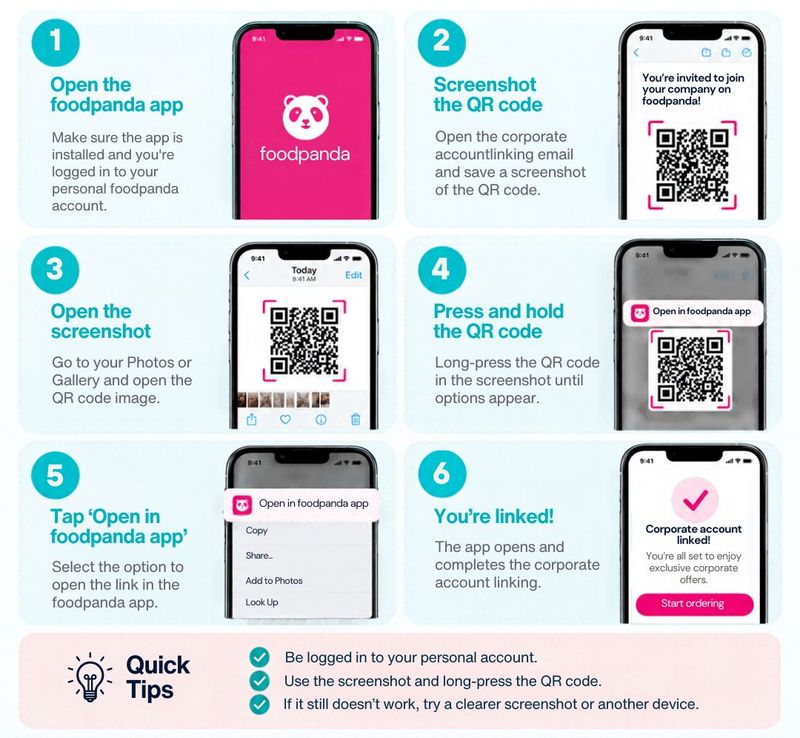
Instead of repeatedly trying to scan the same code, ALLCARE members have another option. The instructions below walk members through an alternative way to connect their ALLCARE account to foodpanda Pro, so they can continue accessing their benefits with ease.
Related Articles

May 31, 2022

Jun 03, 2022

Feb 01, 2020

Dec 28, 2019

Jan 18, 2020